
Short answer:
If your Xink email signature displays HTML code instead of a properly formatted signature in Classic Outlook for Windows, check Microsoft Word's Trust Center > File Block Settings. Make sure both Open and Save are unchecked for Web Pages, if permitted by your organization's IT policy. Restart Outlook and test your signature.
Problem
When composing an email in Classic Outlook for Windows, your Xink email signature may display HTML code or tags instead of the expected formatted signature.
For example, you may see HTML text instead of your company logo, contact details, images, and other signature design elements.
This issue may occur when Microsoft Word's File Block Settings prevent certain HTML content from being processed correctly.
How to resolve the issue
Follow these steps to check the relevant Microsoft Word security settings.
- Close Microsoft Outlook.
- Open Microsoft Word.
- Click File > Options.
- Select Trust Center from the left menu.
- Click Trust Center Settings.
- Select File Block Settings.
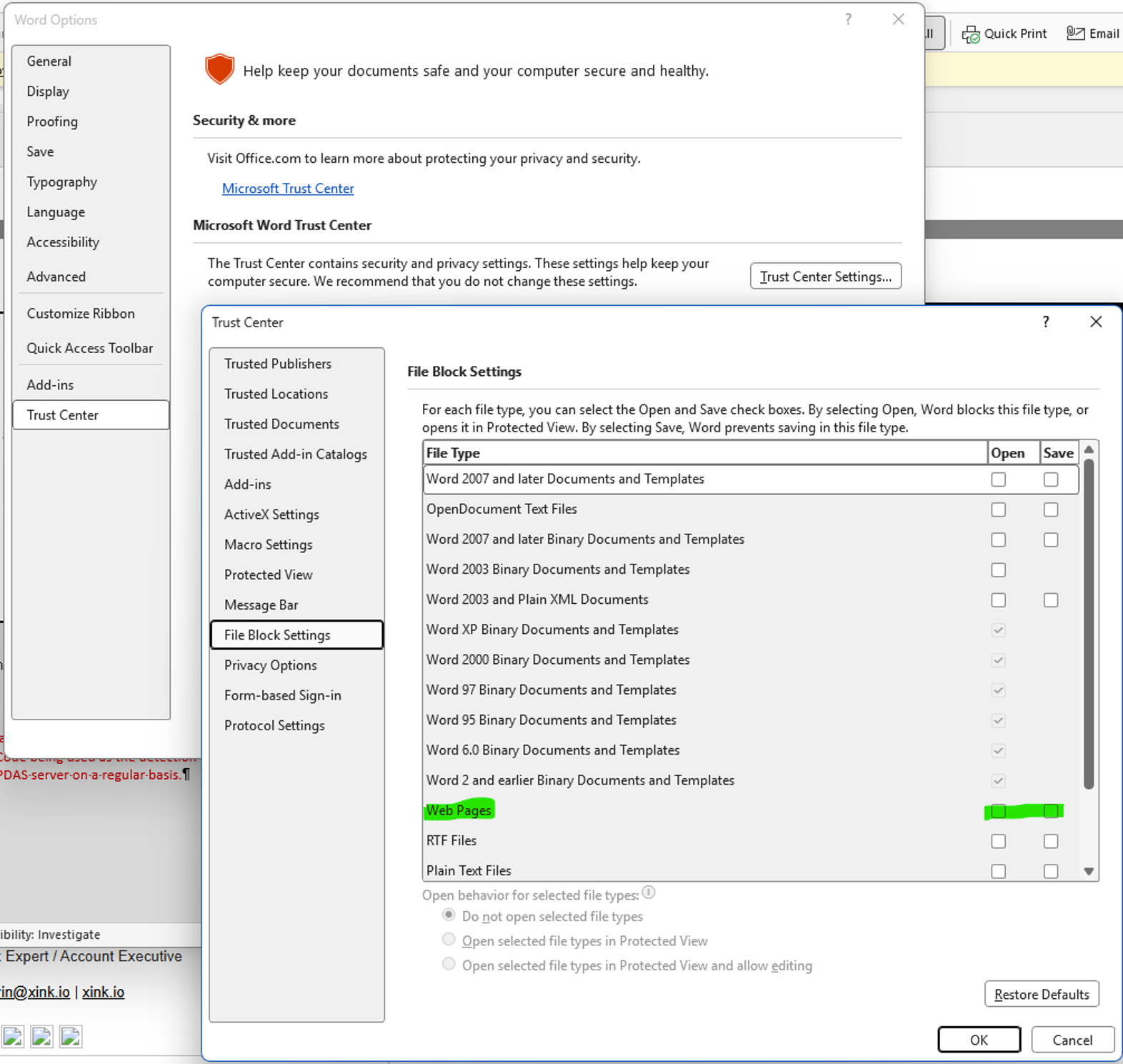
- Scroll down and locate Web Pages.
- Check the Open and Savecheckboxes for Web Pages.
- If either checkbox is selected, clear it only if permitted by your organization's IT security policy.
- If both checkboxes are already unchecked, leave them unchanged.
- Click OK to save the changes and close both settings windows.
- Reopen Outlook, compose a new email, and check whether your Xink email signature now displays correctly.
Reference: The screenshot below highlights the Web Pages setting in Microsoft Word's Trust Center.
Important: Office security settings
File Block Settings are part of Microsoft Office's security controls. Only adjust the Web Pages setting described in this guide.
If your organization manages Microsoft Office security settings, consult your IT administrator before making changes. Do not override security policies enforced by your organization.
Important notes
- This troubleshooting method applies to Classic Outlook for Windows.
- It does not apply to New Outlook, Outlook on the web, or Outlook mobile.
- If both Web Pages checkboxes are already unchecked, no changes are necessary.
- This setting is a possible cause of the issue and may not resolve every case where HTML code appears in an email signature.