
Short answer:
Keep all email signature images under 300 KB and within 800 px to ensure fast loading, reliable display, and better email deliverability. You can use an AI image tool or image editor to resize and optimise your images before uploading them to Xink.
At Xink, our goal is to ensure your email signatures always look professional and load quickly—no matter where your emails are viewed.
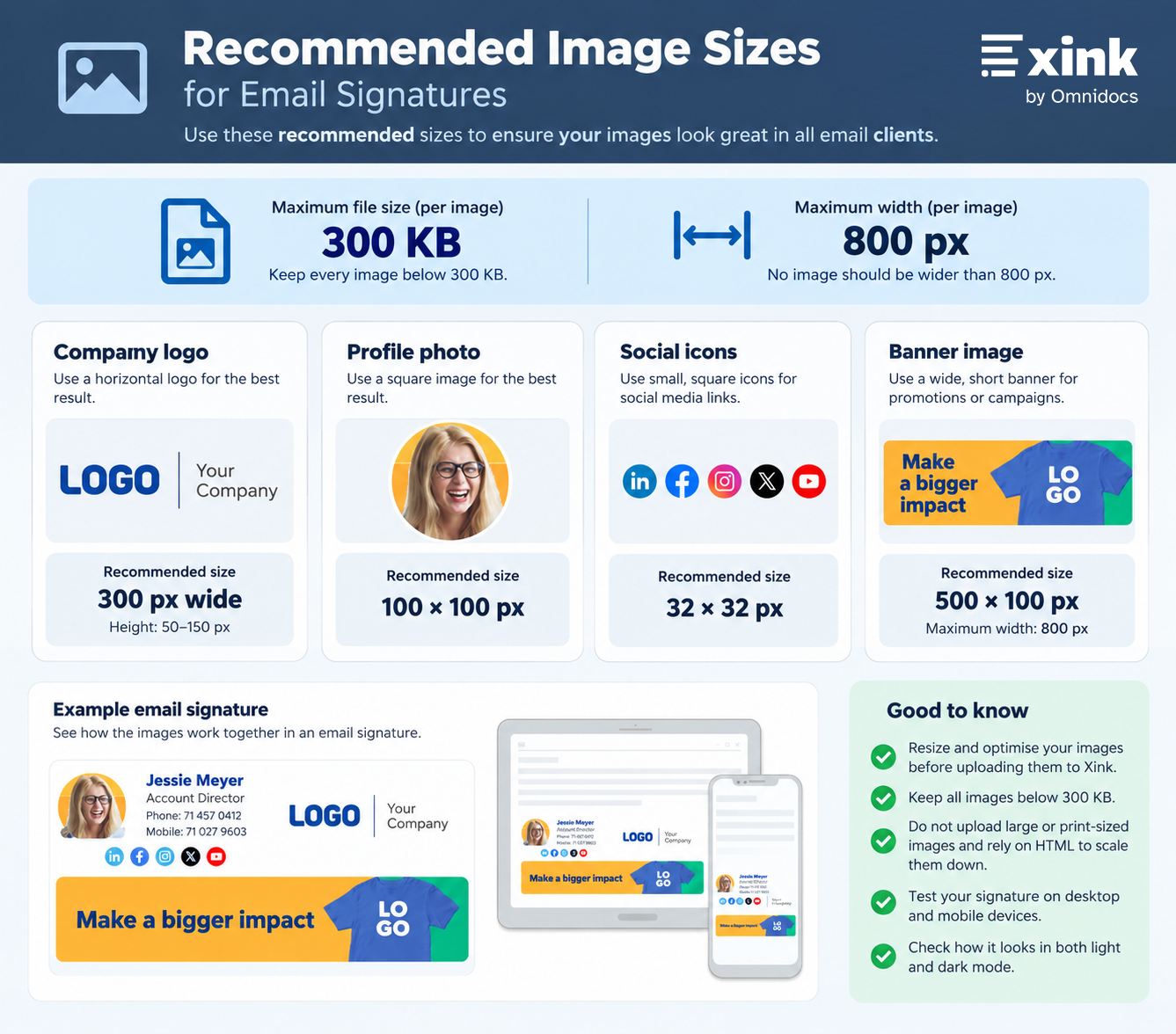
To support this, we enforce a 300 KB maximum file size and a maximum width of 800 px per image. These limits help ensure consistent rendering across email clients while keeping messages lightweight.
Recommended image sizes for Xink email signatures
How to optimise email signature images
You can use any AI image tool or image editor that supports resizing, compression, or web optimisation. Many modern AI tools can resize an image, reduce its file size, and optimise it for email or web use.
For example, upload your image to your preferred AI image tool and use a prompt like this:
Example prompt:
Resize this image to a maximum width of 800 px and optimise it for email and web use. Keep the file size below 300 KB while maintaining the best possible image quality.
Important: Do not upload large or print-sized images and rely on HTML to scale them down. Always resize images before uploading.
Resize first
Reducing image dimensions often decreases file size significantly before compression is applied.Choose the correct format
- PNG: Best for logos, icons, and graphics with flat colours
- JPEG: Best for photos and complex images (use 60–80% quality)
Compress the image
- Resize to the correct pixel dimensions
- Export for screen/web (not print)
- Adjust quality to reduce file size without visible loss
Keep file size low
Aim to keep each image well below 300 KB. Most signature images can be reduced to under 100 KB.Test before publishing
- Add the image to your Xink signature
- Send a test email
- Check on desktop and mobile devices
- Review in both light and dark mode
If the image looks sharp and loads instantly, the optimisation is successful.
Why the 300 KB and 800 px limits matter
✔ Protects email deliverability
Large images increase the overall size of an email and may negatively affect email performance and deliverability. Keeping images under 300 KB helps keep messages lightweight.
✔ Reduces email size
Signature images are included in every reply and forward. Large files can:
- Slow down email loading
- Increase thread size
- Cause issues in long conversations
✔ Saves storage and bandwidth
Email signatures are stored repeatedly across mail systems. Optimised images:
- Reduce storage usage
- Lower bandwidth consumption
- Improve performance on mobile and slower connections
Recommended image dimensions
For most email signatures, the following sizes provide a good balance between image quality and file size:
- Company logo: Around 300 px wide
- Profile photo: 100 × 100 px
- Social icons: 32 × 32 px
- Banner: Around 500 × 100 px
These are recommended sizes rather than strict requirements. Your design may require slightly different dimensions, but no image should exceed 800 px in width or 300 KB in file size.
There is no strict height limit, but shorter signatures generally provide a better experience—especially in long email conversations.

