
Short answer:
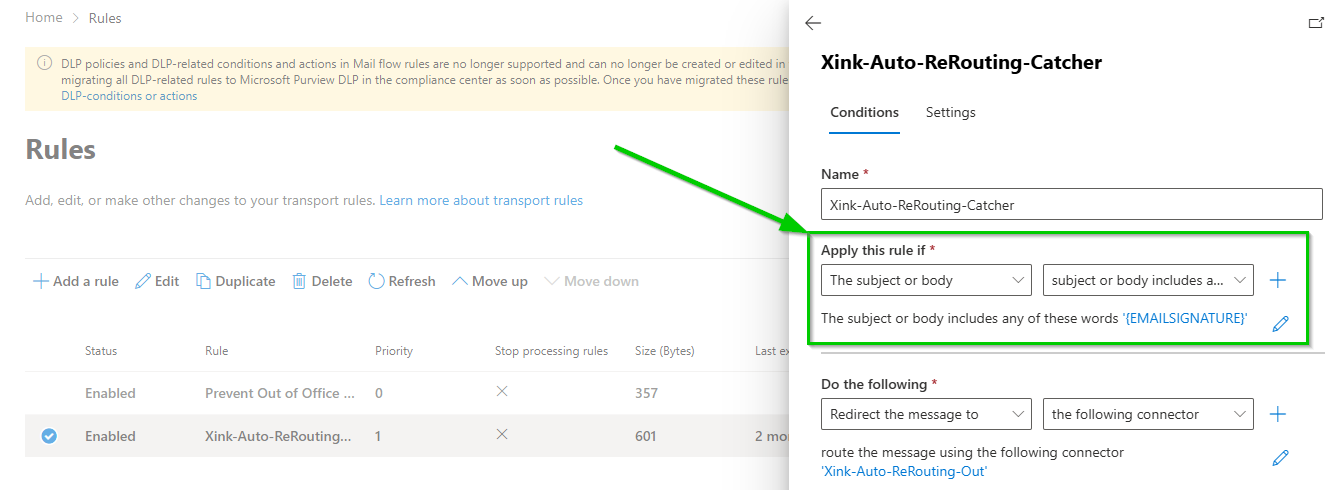
To avoid rerouting all emails, configure the mail flow rule to only route messages that contain a specific marker such as {EMAILSIGNATURE}.
This ensures that only selected emails are processed by the Xink server-side service.
How it works
In the Exchange Online transport rule, you define a condition that only reroutes emails where the message body contains a specific marker.
Example marker:
{EMAILSIGNATURE}Only emails containing this marker will be routed through Xink and have signatures applied.
Requirement
You must define and use a marker (text string) that identifies which emails should be processed.
This marker must be inserted into emails (for example via mobile signature settings or device management tools).
Pros and Cons
Pros:
- No rerouting of emails sent from Outlook on Windows, Mac, Web, or mobile.
- More control over which emails receive server-side signatures.
Cons:
- The marker must be included in emails to trigger processing.
- Requires setup and management (e.g. via MDM for mobile devices).
